
What Is an Oklahoma County Court Docket
A court docket is a dated list of every event in a case. Each line carries a date and a short note. The clerk adds a new entry when a party files something or a judge rules. Think of it as the case timeline. It shows motions, hearings, orders, and the final outcome. Oklahoma County court dockets are kept by the Court Clerk for District Court cases of every type. Most are open to the public. You can read them online without a fee in most instances.
A docket differs from the full case record. The docket tells you what happened and when. The full file holds the actual papers, like the petition, the motions, the exhibits, and the signed orders. A docket line might read "Motion to Dismiss filed." The full record holds the motion itself. Online dockets are quick to scan. The paper file sits with the Court Clerk and may take a copy request to pull. Knowing the gap helps you choose which one you really need.
Oklahoma County sits in the Seventh Judicial District. Its District Court handles civil, criminal, family, probate, juvenile, and traffic cases. Each of those case types builds a docket as it moves.
How to Pull a Docket on OSCN
The Oklahoma State Courts Network is the main statewide docket system. Most people call it OSCN. The OSCN docket landing page covers Oklahoma County District Court along with the other 76 county courts. It is free, and it is the official online source for court dockets in the state.
The landing page gathers a case-number lookup, a name search, and a set of daily report tools in one place. The screen below shows those options together.
The OSCN docket landing page opens with the lookup form front and center.
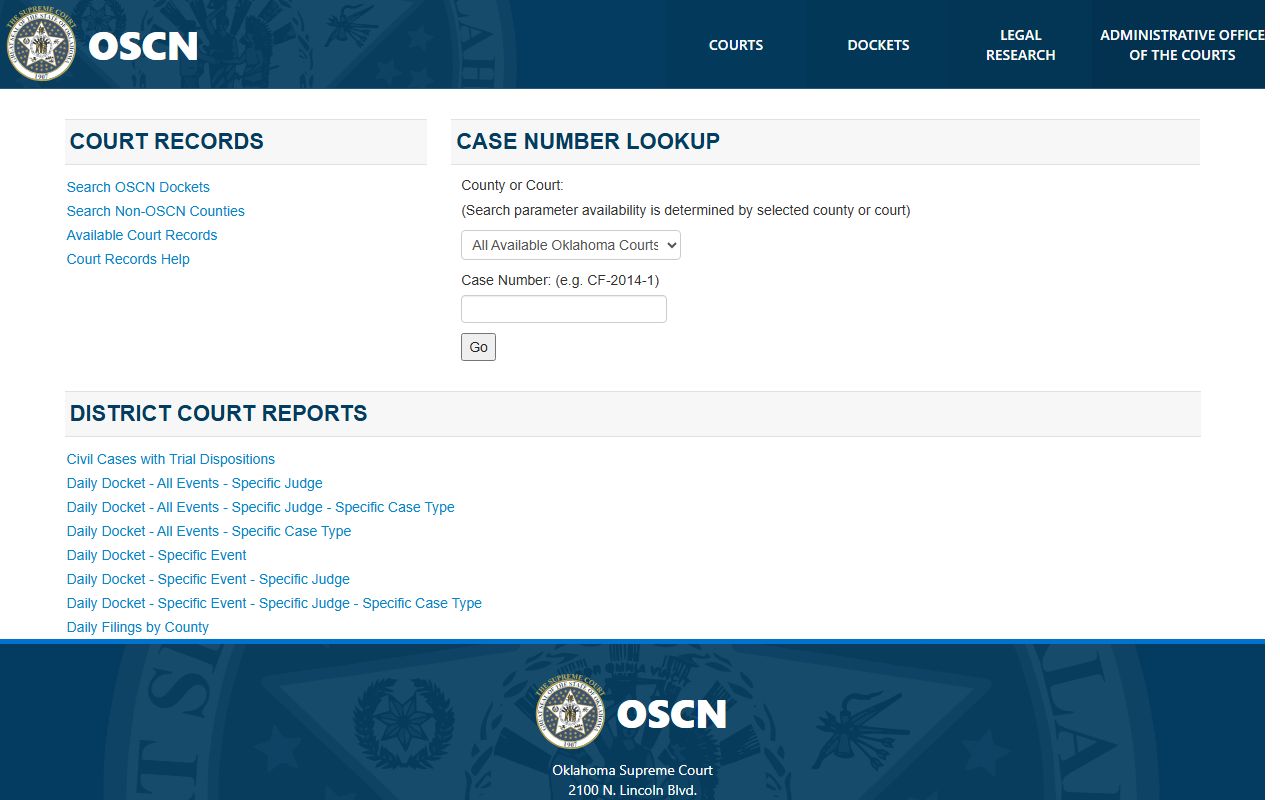
From this screen you pick Oklahoma County District Court, then run a search or open a daily report. The steps below walk through a single case lookup.
- Open the OSCN docket page and choose the search method you want.
- Select Oklahoma County District Court in the County or Court dropdown.
- Enter the case number in the format CF-2014-1, or type a party name instead.
- Click Go to load the case and its full docket.
- Read the entries from the first filing date down to the latest event.
If you already have the case number, the lookup is the fastest route. The fields are simple.
| Field | Type | Required | Notes |
|---|---|---|---|
| County or Court | Dropdown | Yes | All Available Oklahoma Courts; Appellate Courts; Oklahoma County District Court; other county courts |
| Case Number | Text | Yes | Example shown: CF-2014-1 |
| Go | Button | n/a | Submits the case-number lookup |
Note: Court of Criminal Appeals Rule 2.6 says the OSCN search is a public convenience and does not replace the official case file if the two ever disagree.
OSCN Daily Docket Reports
OSCN does more than single-case lookups. It also publishes District Court Reports that pull dockets by day, by judge, by event, or by case type. These reports help attorneys and the public see what is set for a given courtroom. They are handy when you want the whole day, not just one file.
The report menu lets you mix filters. You can ask for one judge, one event, one case type, or a county-wide filing list. The most used reports include the following.
- Civil Cases with Trial Dispositions
- Daily Docket - All Events - Specific Judge
- Daily Docket - All Events - Specific Case Type
- Daily Docket - Specific Event - Specific Judge
- Daily Filings by County
The OSCN docket search page is where a name or number lookup runs once you leave the landing screen.
That search page may show a human-verification step before it loads. Clear the check, and the docket results appear the same way.
Search Oklahoma County Dockets on ODCR
On Demand Court Records, known as ODCR, is a second official channel. It serves many Oklahoma district courts and some tribal courts. Searching is free and unlimited. It is a good backup when OSCN runs slow or when you want a filed-date range. Oklahoma County appears in the court dropdown under the value for the county.
ODCR shines at filtered searches. You can search by partial name, by case number, by filed-date range, or by case type. The form fields break down like this.
| Field | Type | Required | Notes |
|---|---|---|---|
| Court group | Dropdown | Optional | All Courts; Oklahoma District Courts; Tribal Courts |
| Court | Dropdown | Optional | Select Oklahoma to reach Oklahoma County District Court |
| Party name | Text | Optional | Label reads "Last, First" |
| Type of case | Dropdown | Optional | Criminal Felony, Misdemeanor, Traffic Tickets, Probate, Small Claims, Protective Orders, and more |
| Full case number | Dropdown and text | Optional | Prefix dropdown plus case-number fields |
You can reach the ODCR portal at odcr.com. The pricing page confirms that public searching of published court records costs nothing.
Oklahoma County Judge and Courtroom Dockets
Dockets are also organized by judge and courtroom. The Oklahoma County Courthouse stands at 321 Park Avenue in Oklahoma City. The county courthouse directory lists 15 District Judges, 1 Associate District Judge, and 21 Special Judges. Each judge runs a daily docket for the cases set in that room. The District Court website posts judge listings with room numbers, phone lines, and daily docket links.
When you need the calendar for a single judge, the courtroom matters. The examples below show how the listings read.
| Judge | Courtroom | Phone |
|---|---|---|
| C. Brent Dishman | Room 315, 321 Park Avenue (Civil Docket) | 405-713-1451 |
| Lydia Y. Green | Room 722, 321 Park Avenue | 405-713-7101 |
You can browse judge profiles and assignment detail through the Oklahoma County District Judges page. For a wider look at how cases reach each courtroom, see the county District Court overview.
How to Read Oklahoma County Docket Entries
A docket can look like code at first glance. Each entry is a short label for one court event. Once you learn the common terms, the case story reads in order. A criminal docket often moves from charges to arraignment to plea, then on to hearings and a final judgment. The terms below show up again and again.
- Motion filed
- A written request asking the judge to take some action in the case.
- Order entered
- The judge's signed ruling on a motion or on the case itself.
- Arraignment
- The first formal hearing where the charge is read and a plea is taken.
- Plea
- The defendant's answer to a charge, such as guilty or not guilty.
- Continuance
- A postponement that moves a hearing to a later date.
- Judgment and sentence
- The final ruling and the punishment set after a conviction.
- Warrant issued or recalled
- A warrant created, often for a missed date, or canceled once the matter clears.
Financial lines show up too. You may see fines, court costs, bond amounts, and restitution. Each carries its own date and amount.
Docket vs Full Case Record
The docket and the full case record are two different things. The docket is the index of events. The full record is the stack of documents behind those events. A docket entry names a motion. The full file holds the signed motion and any exhibits. Online dockets are fast and free, but they do not always carry the document images. For the actual papers, you may need a copy from the Court Clerk. The county court records page walks through the broader request options.
| Docket | Full Case Record | |
|---|---|---|
| Format | List of dated entries | Full documents and exhibits |
| Access | Often online and free | May require a fee or visit |
| Use | Track case progress | Legal review and evidence |
Note: A docket can confirm a hearing date or a disposition in seconds, but a certified document still has to come from the Court Clerk's office.
Court Clerk Copies of Oklahoma County Dockets
Some dockets and documents are not online. Older cases, sealed images, certified copies, and authenticated records all run through the Oklahoma County Court Clerk. The office is at 320 Robert S. Kerr Avenue, Room 500, in Oklahoma City. You can reach the records line at 405-713-1705. A request form asks for the case number, the filing year, the party names, and the document titles you want.
Attorneys and state agencies now file through the state e-file system, which posts new entries onto the same dockets you read online. The portal below is the front door for that filing.
The Oklahoma e-file portal is where attorneys and agencies submit court documents.
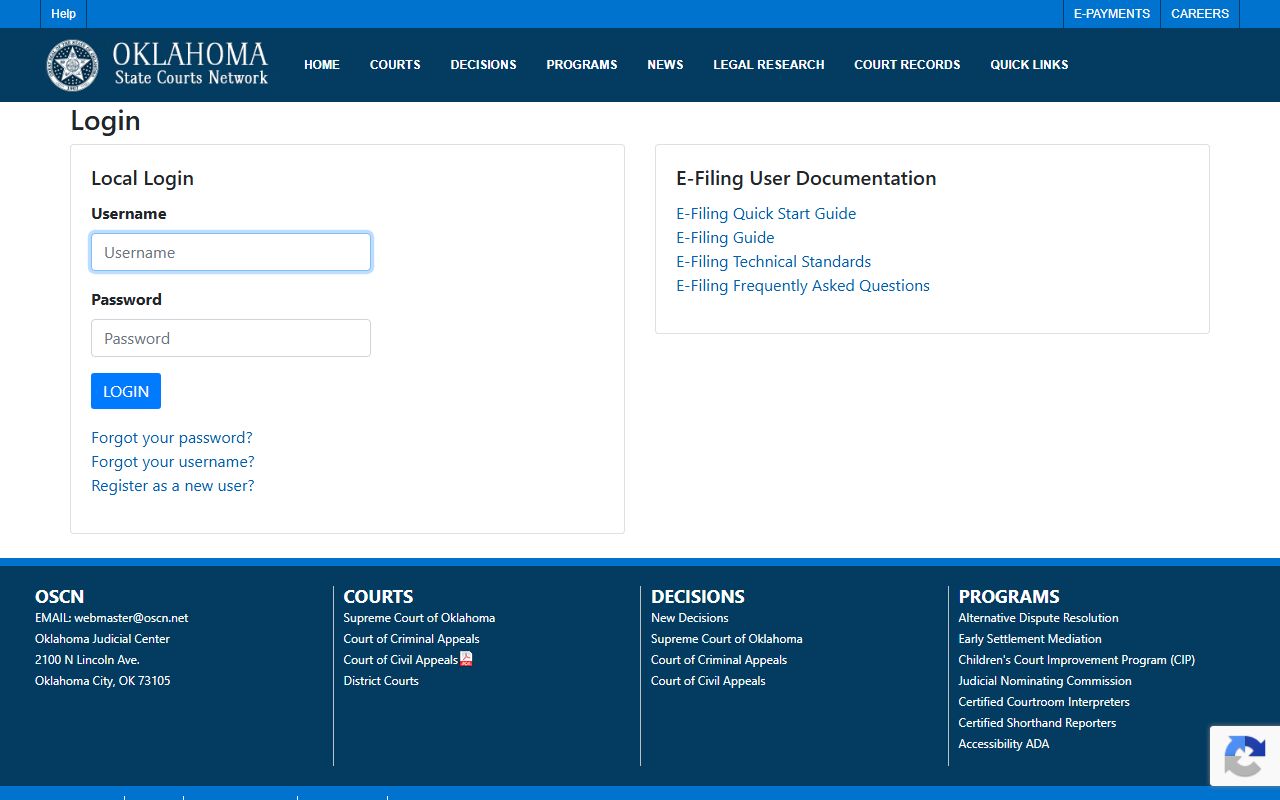
Once a filing clears the e-file system, the clerk dockets it and it shows up in the public record. To order a copy of any of those filings, use the Court Clerk records request form. Copies run $1.00 for the first page and $0.50 for each page after. Certification of a document adds $0.50.
Payment is by check or money order. The office emails the fee total within 10 business days and asks for another 10 business days to process after payment arrives.
Traffic and Municipal Dockets Stand Apart
Not every traffic or city case lands on a District Court docket. County traffic tickets filed in District Court do show on OSCN and ODCR. City tickets are different. Oklahoma City Municipal Court keeps its own docket for parking, traffic, and ordinance cases. That court sits at 701 Couch Drive in Oklahoma City, and its payment window number is 405-297-2884.
So a single person could have charges in three places at once. A felony might sit on the District Court docket. A speeding ticket might sit with the city. Each system is separate. County ticket payments and case lookups route through the Court Clerk and the state pay portal, while city tickets stay with the municipal court.
Note: A municipal bench warrant may not appear on the county sheriff list, so check the issuing city court when a ticket is tied to Oklahoma City rather than the county.
Federal PACER Dockets for Oklahoma County
Federal cases never appear on OSCN or ODCR. Oklahoma County falls within the U.S. District Court for the Western District of Oklahoma. Its dockets live in the federal CM/ECF system and are read through PACER. The federal courthouse stands at 200 NW 4th Street in Oklahoma City. The court has scanned most filings since 2003, so the records are electronic.
To reach federal dockets, you register for an account and search by court. Two pages start that process.
- Use the PACER Court CM/ECF Lookup to find the right federal court.
- Open the Western District CM/ECF page for local e-filing and access help.
- Search a case by party name or by federal case number once you log in.
Federal viewing may carry a per-page charge, which differs from the free state dockets. Bankruptcy matters for the area run through the U.S. Bankruptcy Court for the Western District, a separate docket system again.